
What does compress JPEG mean?
Compress JPEG means making a JPEG image smaller in file size. It removes unnecessary image data so the picture loads faster and uses less space, while still looking almost the same.
Features of Compress JPEG to 100KB
-
Free & Fast – Compress images quickly without any cost.
-
Simple to Use – Just upload and reduce file size, no tech skills needed.
-
Secure – Files are automatically deleted after compression.
-
Batch Support – Compress multiple JPEGs at once.
-
Works Anywhere – Compatible with PC, tablet, or mobile.
Some Interesting Points
1 – Does compressing JPEG reduce image quality?
JPEG compression reduces image quality by removing small, unnoticeable details to make the file smaller, and this quality loss is permanent.
2 – Does compressing an image hold any value in Google’s eyes?
Yes, compressing images helps Google because smaller images load faster, which improves website speed — a key factor in SEO. Faster websites give a better user experience, and Google favors sites that load quickly. So, using compressed images can indirectly boost your rankings.
3 – Will a compressed image count as duplicate content in Google?
No, compressing an image does not make it duplicate content. Google sees the image file itself, not just its size. As long as the image is unique or properly credited, compressing it for smaller size will not harm SEO. It only helps your site load faster, which is good for rankings.
4 – Should we use a paid image compression tool or a free one?
It depends on your needs:
-
Free tools are good for small websites or occasional use. They work well and save money.
-
Paid tools offer better quality, faster compression, batch processing, and extra features for larger websites or businesses.
How to Convert JPG to WebP (4Easy Steps)
To turn a JPG into a WebP using Pixelied:
-
Go to https://pixelied.com/convert/jpg-converter/jpg-to-webp.
-
Upload your JPG file by clicking “Choose Files” or dragging the image into the upload box.
-
Click “Start Conversion” to begin changing the format.
-
When ready, click “Download WEBP” to save your converted image.
How to Convert PNG to WebP Easily
-
Upload your PNG by clicking “Choose Files” or dragging it into the box.
-
Click “Start Conversion” — your PNG will turn into WebP.
-
Once done, click “Download WEBP” to save your new image.
See in Image simple method PNG to WebP
How to Compress JPEG to 100KB
-
Go to Compress JPEG to 100KB.
-
Upload your JPEG file.
-
Set the target size to 100KB.
-
Click Download to save the compressed image.
How to Compress or Convert JPEG to JPG Easily
-
Visit the tool: Open FreeConvert JPEG to JPG in your browser.
-
Upload your image: Click “Choose Files” or drag your JPEG into the upload area.
-
Convert: Press “Convert to JPG” to start the process.
-
Download: When ready, click “Download JPG” to save your compressed image.
Searching Method Compress Image in Google
How to search 10K of image compressed less then 100k websites
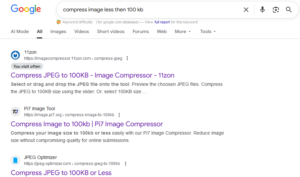
To find thousands of websites for compressing images:
-
Go to Google.
-
Type “compress image less than 100 KB” in the search bar.
-
Press Enter.
-
You will find more than 200 free websites that let you compress images quickly and easily.
Mehod of Searcing “PNG to Webp” Websites Free in Google

-
Go to Google.
-
Type “PNG to Webp” in the search bar.
-
Press Enter.
-
You will find more than 100 free websites in google first 10 pages that let you compress images quickly and easily.
If you want to search more use keywords in google “JPG to PNG” and “PNG to JPG” All top sites will be free so you do not write to type free compressed image websites.
Our Collection of top 10 Compress Images Websites List in 2026
We have carefully collected this list of image compression websites after hardworking from Google, so you can easily use any of them. This list is up-to-date for 2026.
Top Free Image Compression Websites 2026
- FreeConvert Image Compressor – Free, online tool (Global)
- Simple Image Resizer – Resize & compress images easily (Global)
- Pixelied PNG to WebP Converter – Convert PNG to WebP & compress (India)
- PI7 Image Compressor – Compress images to 100KB fast (Global)
- iLoveIMG – Compress, edit, and resize images (Spain)
- TinyWow Image Compressor – Free online tool for fast compression (Global)
- TinyJPG – Compress JPEG and PNG images easily (Netherlands)
- Squoosh – Open-source, browser-based image compression (Global)
- TinyPNG – Compress PNG & JPEG with high quality (Netherlands)
- Duplichecker Image Compressor – Free online compression tool (India)
- JPEG Optimizer – Compress JPEGs up to 100KB (USA)
How to Choose the Best Image Compression Site From 10 Websites
To pick the best site from the top 10:
-
Check file size limits – Make sure it can compress as needed.
-
Maintain quality – The image should still look good.
-
Ease of use – Simple and fast is better.
-
Batch support – Useful for multiple images.
-
Extra features – Editing or format conversion is a bonus.
-
Security – Your images should stay private.
Which Image Compression Site is the Best for Me?
For me, the best site to convert PNG to WebP is Pixelied. And if I want to compress an image to under 100KB, I always use 11zon Image Compressor