

What Is Email Signature Software
Email signature software is a digital tool that helps businesses create, control, and apply professional email signatures for all employees from one central system. Instead of every employee designing their own signature, the software ensures that every outgoing email follows the same brand style, layout, and legal rules.
Why Is It Used?
Companies use email signature software to:
-
Maintain brand consistency.
-
Avoid outdated or incorrect contact details.
-
Add legal disclaimers automatically.
-
Promote marketing campaigns through banners.
-
Save IT and admin time.
-
Ensure signatures look perfect on all devices.
Email Signatures Importance for Businesses
Employees send dozens of emails every day. Each email is a direct brand touchpoint. A poorly designed or inconsistent signature can make a company look unprofessional, while a clean, branded signature builds trust, credibility, and recognition.
Without software:
-
Employees change fonts and colors
-
Logos break on mobile devices
-
Legal disclaimers are removed accidentally
-
Updates take weeks instead of minutes
Email signature software solves all of these problems in one place.
Free Email Signature Software: Benefits and Loses
Free email signature tools are usually basic generators. They allow users to create a simple signature using a form or template.
Benefits of Free Email Signature Software
-
No cost
-
Easy to use
-
Suitable for freelancers or very small teams
-
Basic design options
-
Quick setup
Limitations of Free Email Signature Software
-
No central control for companies
-
Employees can change signatures anytime
-
No automatic updates
-
No analytics or tracking
-
No compliance or regional disclaimers
-
Poor compatibility across devices
-
No support or security guarantees
Best for:
Freelancers, solopreneurs, or startups with 1–5 users and no compliance needs.
Benefits of Using Free an Email Signature in Gmail
Using an email signature in Gmail gives your business many hidden advantages. Every email you send becomes a marketing and trust-building tool without extra cost.
Key Benefits of Gmail Email Signatures
-
Professional Image
A well-designed email signature makes your business look reliable and professional instead of casual or unorganized. -
Brand Awareness
Your logo, brand name, and website appear in every email, helping clients remember your business. -
More Website Traffic
Adding your website link in the signature brings visitors to your site automatically. -
Easy Client Contact
Clients can quickly call, email, or visit your website using the contact details in your signature. -
Free Marketing Tool
Every email becomes a free advertisement for your services.
Can Clients Choose Services After Seeing an Email Signature?
Yes, absolutely.
Many clients decide to explore or purchase services after seeing a professional email signature. A clean and attractive signature builds trust and confidence, which directly influences buying decisions.
A good email signature can:
-
Show your expertise
-
Highlight your services
-
Direct clients to your website
-
Make your business look established
When a client trusts your brand, they are more likely to take action.
How to Create a Good Email Signature in Gmail
Follow these simple steps to add a strong email signature:
-
Open Gmail
-
Click Settings → See all settings
-
Go to the General tab
-
Scroll down to Signature
-
Click Create new
-
Add your content (text, logo, links)
-
Format neatly (simple fonts, clean layout)
-
Scroll down and click Save Changes
Tips for a High-Quality Email Signature
-
Keep it simple and clean
-
Use your brand colors
-
Add your website link
-
Avoid too many images
-
Make it mobile-friendly
Paid Email Signature Software: What Makes It Different?
Paid email signature software is designed for companies, teams, and enterprises. It provides full control, automation, security, and analytics.
Benefits of Paid Email Signature Software
-
Centralized management for all employees
-
Locked templates (employees cannot edit designs)
-
Automatic data updates from company directory
-
Works across Outlook, Gmail, mobile, and web
-
Legal disclaimers applied by country or department
-
Marketing banners added instantly
-
Click tracking and performance analytics
-
Strong security and access controls
-
Saves IT and admin time
Disadvantages of Paid Email Signature Software
-
Monthly or yearly cost
-
Initial setup requires planning
-
Needs coordination between IT and marketing
-
Overkill for very small teams
Best for:
SMEs, growing businesses, agencies, and enterprises that care about branding, compliance, and scalability.
Free vs Paid Email Signature Software: Which Is Better?
| Feature | Free Software | Paid Software |
|---|---|---|
| Cost | Free | Paid subscription |
| Brand control | ❌ No | ✅ Full control |
| Central management | ❌ No | ✅ Yes |
| Auto updates | ❌ No | ✅ Yes |
| Legal compliance | ❌ No | ✅ Yes |
| Marketing banners | ❌ No | ✅ Yes |
| Analytics | ❌ No | ✅ Yes |
| Security | ❌ Limited | ✅ Strong |
| Best for | Individuals | Companies |
Email Signature Top 5 Example
Example 1: Simple & Professional
| OnlineBuyPro Team 📧 support@onlinebuypro.com 🌐 onlinebuypro.com Smart Online Shopping Solutions |
Example 2: Service-Focused Email Signature
| OnlineBuyPro Your Trusted Online Buying Partner 🌐 Visit our website ✔ Product Research ✔ Best Deals ✔ Secure Online Buying |
Example 3: Trust-Building Signature
| OnlineBuyPro Helping You Buy Smarter Online 🌐 onlinebuypro.com ⭐ Quality Products | Fast Support | Trusted Service |
Example 4: Marketing-Oriented Signature
| OnlineBuyPro Discover Smart Deals Online 🌐 Check Latest Offers 🛍 Visit our website for exclusive online deals |
Example 5: Minimal & Clean Signature
| OnlineBuyPro Online Shopping Made Easy 🌐 onlinebuypro.com |
Which Website Is the Best for Making a Free Email Signature?
If you want to create a professional email signature for free, there are several good websites available online. These tools help you design clean and attractive email signatures without coding or technical skills.
Best Free Email Signature Generator (Recommended)
Mail-Signatures.com – Signature Generator
This website is one of the best free options for creating email signatures. It allows users to enter their name, job title, company details, and website, then instantly generates a ready-to-use signature.
Why this site is a good choice:
-
Completely free to use
-
Simple and beginner-friendly
-
Generates clean HTML signatures
-
Works well with Gmail, Outlook, and other email services
-
No technical knowledge required
You can easily copy the signature and paste it into Gmail settings.
Other Good Free Email Signature Websites
HubSpot Email Signature Generator
A trusted and free tool that creates professional signatures in minutes. It is especially good for business users who want a clean and reliable design.
WiseStamp Free Signature Tool
This tool offers stylish designs and customization options. The free version is suitable for personal and small business use, though it may add a small branding line.
Salesmate Signature Generator
A good option for users who want call-to-action buttons and social media icons in their email signatures.
Which Free Tool Is Best Overall?
If you want simplicity and clean design, Mail-Signatures.com is a strong choice.
If you want very easy setup and trusted branding, HubSpot is also excellent.
For most users, Mail-Signatures.com is the best free email signature generator because it gives professional results without restrictions.
How to Make a Free Email Signature (Step by Step)
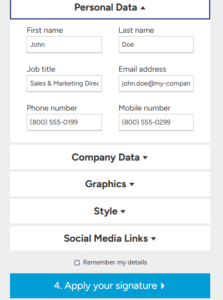
Free Email Signature Generator – mail-signatures
You can create a professional email signature for free by using the Mail-Signatures.com Signature Generator. The process is simple and does not require any coding skills.
Step 1: Open the Signature Generator
Go to the email signature generator page on Mail-Signatures.com.
Once the page loads, you will see a form with multiple sections to fill in your details.
Step 2: Enter Personal Data
In the Personal Data section, fill in your basic information:
-
First Name – Enter your first name
-
Last Name – Enter your last name
-
Job Title – Write your role (for example: Sales Manager, Support Team)
-
Email Address – Add your professional email
-
Phone Number – Enter your office phone number (optional)
-
Mobile Number – Add your mobile number if you want clients to call you directly
This information helps recipients easily identify and contact you.
Step 3: Add Company Data
In the Company Data section:
-
Enter your company name
-
Add your website URL
-
Include office address if required
This step builds trust and gives your email a professional business identity.
Step 4: Choose Graphics (Optional)
In the Graphics section, you can:
-
Upload your company logo
-
Add a profile photo (optional)
Tip: Use a small, clear image so the signature loads fast and looks good on mobile.
Step 5: Select Style and Design
In the Style section:
-
Choose font style and size
-
Pick text and link colors
-
Adjust spacing and alignment
Keep the design simple and clean for best results across all email clients.
Step 6: Add Social Media Links
In the Social Media Links section:
-
Add links to Facebook, Instagram, LinkedIn, X (Twitter), or YouTube
-
Enable only the platforms you actively use
Social links help increase credibility and brand visibility.
Step 7: Remember My Details (Optional)
You can check “Remember my details” if you want the website to save your information for future use.
This is helpful if you plan to update or recreate your signature later.
Step 8: Generate and Copy the Signature
Once all details are entered:
-
The email signature preview appears instantly
-
Copy the generated signature